Working With Claude: 15 Lessons From Running a Company on It
Most advice about AI tools is one of two things: breathless hype, or a listicle of clever prompts you'll never reuse. This is neither. It's what I've actually learned running a company with Claude on the desktop — the habits that made it useful, the places it fails, and the setup that turns it from a chat box into something that does real work.
A word on why I'd know. I run Squirrel & Co, an AI-powered company — we use AI to build products for human connection. So I'm not asking Claude to polish the occasional email; I'm running product, engineering, marketing, and operations through it most days, and paying close attention to where it earns its keep and where it quietly wastes my time. What follows is the accumulated result: fifteen lessons, grouped into six themes — how to think about the collaborator, how to prompt it, how to set up its context, how to give it reach, how to put it to work, and how to level the whole thing up.
One frame sits under all of it, so it goes first.
The mindset
Claude has a genius's knowledge and a rookie's judgment. The best way I've found to work with it is to manage it like a person — the smartest and the dumbest colleague I've ever had, at the same time.
Book-smart, it's extraordinary. It knows more than I do about almost everything, writes faster than anyone, and can hold an entire project in its head at once. But street smarts? None. It will do something genuinely brilliant and miss the obvious thing that would have made it useful.
Two that I actually hit. I asked for a customer segmentation and got a sharp one back — clean segments, clear positioning, the kind of slide a consultant would charge for. It never once addressed the question that actually mattered: do I have any way to reach these people? Beautiful strategy, no path to act on it. Another time I had it build a piece of software and it produced a complete, working engine — all the hard machinery, correct — with no user interface at all. Nothing a human could click.
Both times the thinking was excellent. What was missing was the street-level "…and then what?" that a colleague with a few years of scars would have flagged in a second. The missing UI was obvious the moment I saw it. The segmentation was the dangerous one — it could have carried me a long way down the road before I hit the wall of "and I can't actually reach any of them." Knowing to ask that question up front isn't something the model brings. That part is on me, and it's exactly why I don't buy that AI is a tool for the young generation only. Experience is what catches the dead end early.
So I hold two things at once: it's the most capable teammate I've ever had, and it needs the most supervision. Knowing where to look for the blind spots is most of the skill.
Get more out of every prompt
"Facts only, no guessing." Claude is a world-class pattern-completer. That's the strength, and it's also the trap. Give it a handful of loosely related facts and it will hand back a clean, confident story that ties them together — even when the honest answer is "these might not be connected at all." The writing is smooth and the logic reads as airtight, so the gaps don't announce themselves; you have to go looking.
Where it bites hardest is debugging. Claude gets stuck on a bug and starts proposing fixes that sound completely plausible and solve nothing — each one a confident guess at a cause it never actually confirmed. You can burn an hour chasing its theories. My reset is a single instruction I keep on hand: no guessing, only proven facts — and, usually in the same breath, check it with a web search instead of filling the gap yourself. It's remarkable how often that one line turns a spinning debugging session back into a methodical one.
For bigger, fuzzier calls — how to price a plan, which channel to bet on — I reach for a different prompt: "what's wrong with this approach?" It flips Claude from agreeing with me to poking holes in the plan, and the shaky assumptions surface fast. I still trust it to spot patterns. I just don't let it treat a guess as a finding, and a pointed "facts only" or "what's wrong with this?" is almost always enough to get there.
Don't take Claude's first "I can't." Give it something genuinely hard and it tends to tap out early. It'll declare partial success, offer a workaround instead of the real fix, or just tell me it can't — usually a beat before that's actually true. Left alone, it optimizes for an answer that looks reasonable, not the one I asked for.
So persistence is my job, and it's mostly a small set of questions I keep on hand: "You did it before — why can't you do it now?" "Are you sure you don't have access to this?" "What do you need to get it done?" "Are you sure of your answer?" And, almost always: "check your answer with a web search." None of them are clever. They just refuse to accept the first "I can't" at face value — and most of the time, one of them gets it moving again. The ability was usually there; it just stopped short.
For how to use Claude, ask the web — not Claude. Claude will happily tell you how to get the most out of Claude, and that's the answer I trust least. It's great at the task in front of it, but ask it for best practices on itself — how to structure a prompt, how to use a feature that shipped last month — and the advice comes back generic, dated, or just off. The tools and the conventions around them move faster than the training data, so most of what actually works was figured out by other people and written up somewhere well after the model was trained. When I want the current best way to do something with Claude, I have it look up the docs, the changelogs, and what other people are doing, and go from there. Trust Claude to do the work; don't treat it as the authority on how to work with Claude.
Set up your context
The biggest upgrade wasn't better prompts — it was the files Claude reads. For a long time I thought getting more out of Claude was about phrasing. It isn't, mostly. The step change came from a few files it reads around the conversation. Three kinds do most of the work:
A CLAUDE.md it loads automatically at the start of every session — my standing context: how I work, the conventions I follow, what each project is. I don't attach it or remind Claude it's there; it just always is. Skills, which are small files describing how to do one particular thing, pulled in on demand when a task calls for them rather than kept in memory all the time. And commands, routines I trigger on purpose — a specific sequence I want run the same way each time.
The short version: CLAUDE.md is what Claude always knows, skills are what it can reach for, and commands are what I invoke by hand.
The one that needs care is CLAUDE.md, because it loads on every session — so it's the file that can quietly bloat. And bloat isn't only a token-cost problem: once an .md file gets long, Claude starts forgetting the top of it — instructions near the beginning quietly stop being followed, even though they're sitting right there. So keeping the entry file short is also about keeping what matters inside the range it reliably pays attention to. The trick is that CLAUDE.md doesn't carry everything itself; it's mostly a set of pointers to deeper files that only get read when a task actually touches them. To put a number on it: the CLAUDE.md for one of my projects is about 450 lines, but it's the doorway to roughly 100 reference files and some 15,000 lines of documentation — almost none of which loads on any given session. The entry point stays lean on purpose; the depth waits behind it, read only when it's needed. Skills and commands behave the same way — pulled in on demand rather than held in memory — so they don't weigh down the standing context either.
None of it is complicated on its own. The point is that my setup stops living in my head — or in a chat that scrolls away — and starts living in files I can reuse and improve.
Keep skill files thin — point, don't embed. This one is less about size than about a specific, maddening quirk: getting Claude to reload a skill after you've edited it is flaky. You change the skill, run it again, and it cheerfully uses the old version — the update just doesn't reliably take.
So I keep the skill itself thin. It doesn't hold the real logic; it's a short pointer to a separate file where the actual workflow lives. The skill barely ever changes, so the reload problem never gets a chance to bite. And the file it points to is read fresh on every run — so I can rewrite that file freely and the change takes effect immediately, with none of the fighting to make Claude pick up the new version.
It looks like a tidiness habit. It's really a reliability one. A thin pointer in front of a file that's always read fresh is what lets a growing set of skills stay editable — instead of turning into a pile I'm afraid to touch.
Give it reach
Plugged into my tools, Claude stops talking and starts doing — mostly for free. Files and skills make Claude organized. Tools are what let it actually do things. On its own, a chat box just talks back; connected to my tools, it works inside my real data. It falls into a few tiers.
The apps I already live in: Claude pulls up and updates deals in my CRM, reads and drafts email, handles calendar and issues — instead of me copy-pasting between six tabs. Creative tools too, which surprised me more than they should have: the banner images for this very series were made by Claude in Canva. I described what I wanted, it generated the design, dropped in my logo, and exported the file — I never opened Canva. And the tier I underused at first: a shell with API tokens. Claude writes and runs small scripts that call any API directly, so I'm not limited to the polished, official connectors. If a service has an API, Claude can reach it — and this series is the proof. The carousel version of these posts goes up on LinkedIn on a weekly schedule with no posting product in the loop: when the ready-made scheduler couldn't publish the carousel format to my profile, Claude just wrote a script against LinkedIn's own API and posted it directly. Between the connectors and a shell that can hit anything, there's very little it can't touch — and most of it costs nothing to set up.
Tell Claude to search the web, and half your dead ends disappear. Left to itself, Claude answers from memory, and it usually won't reach for the web on its own. So when it's clearly struggling or starting to guess, I just tell it to search — and a lot of dead ends turn straight into answers. With some practice I've started to sense which questions will be tricky before I even ask, and I tell it to search from the start rather than waiting for it to stall.
The reason it works is simple: I'm rarely the first person to try whatever I'm doing. Someone has probably hit the same wall, and if they did, odds are they wrote it down somewhere. Pointing Claude at that is faster and more reliable than having it reason the whole thing out from scratch. A good chunk of my own workflows started exactly this way — Claude found an .md file someone had already published, and I adapted it to my setup instead of building from nothing.
Put it to work
I don't design workflows; I run them, then have Claude save the recipe. Building a workflow sounds like work. It's lazier than that. I just do the task once, in a normal session. Once it works, I ask Claude to save what we did as a reusable recipe — a skill file. The messy live run becomes something I can trigger next time, and I never wrote a spec.
Then I improve it by using it. When a step trips up, I tell Claude to fix that part of the file, and each run leaves it a little sharper than the last. One habit saves real time on the long ones: a big workflow usually stumbles in a few places. Instead of stopping to fix each hiccup as it happens — which breaks the flow and my concentration — I let the whole thing run to the end, then ask Claude to list everything that caused friction and fix it in one pass. Going through the frictions together is faster than interrupting five times, and Claude still has the entire run as context when it does. I don't write any of these files by hand. Claude does. My job is to run the thing, notice what's clunky, and point.
Once a workflow is written down, I start it and walk away. The real payoff of a written-down workflow isn't just consistency — it's that I don't have to sit there. Early on I treated Claude like a chat: ask, wait, read, ask again, babysitting every step. Once the workflow exists, I don't need to. I kick it off and go do something else while it runs.
That changes how much fits in a day. I'll set a long job going in one place, move to a different task in another, and come back to the finished result — instead of watching a single thing crawl to the line. The mental shift is to stop thinking of Claude as something you talk to and start thinking of it as something you hand work to. Then the question stops being "what do I want to ask?" and becomes "what can I set running?"
I build the review into the workflow. Claude makes confident mistakes, so its output always needs checking. To be clear, the systematic checks I'm about to describe don't replace my own review — they sit alongside it. Their job is different: they keep the work from quietly drifting as it piles up, so my own attention goes to the things that actually need judgment instead of catching the same routine problems over and over.
They come in two forms. Some are wired into a workflow and simply run, without me having to think about them — a coding routine, for instance, that tests each change as it goes and runs review passes at a set interval, so quality gets checked continuously rather than in one big audit at the end that I'll probably skip. Others are review skills I trigger myself when it's time — like a pass over my documentation that flags files which have grown too big or started repeating each other.
The distinction I care about isn't automatic versus manual; it's that review stops depending on me remembering. The built-in checks run every time by construction; the skills are there the moment I reach for them. Either way, catching drift becomes the process's job — and my judgment is freed for the calls that genuinely need it.
Level up
A Markdown file is what makes two tools one system. I work with Claude in two places: one built for files, documents, and orchestration — where I think, plan, draft, and wire tools together — and one that lives inside a codebase, for precise changes, tests, and the actual engineering loop. Most of the leverage comes from using both, not forcing everything through whichever one I happen to have open. That was a mistake I made for a while.
What makes the two fit together is, of all things, a plain Markdown file. One workflow writes its output to an .md with a clear structure and conventions, and the next picks it up and runs from there. The file is the handoff, and it works in two directions: between the tools — the orchestration side produces a structured spec, the code side reads it and makes the exact changes in the repo — and within a single tool, where I break a big job into stages that hand off through .md files so no one workflow gets large enough to become unreliable. Same model underneath, good at different things, and a shared .md format is what lets each step hand work to the next without me re-explaining anything. The Markdown file does the remembering.
Claude built me a dashboard that keeps itself up to date. Most of what I get from Claude is a one-time answer: I ask, it responds, the conversation scrolls away. This one is different, and it runs on a feature called Artifacts. An Artifact is a small, self-contained web page that Claude writes and saves — and what makes it more than a screenshot is that each time I open it, it pulls fresh data from my connected tools.
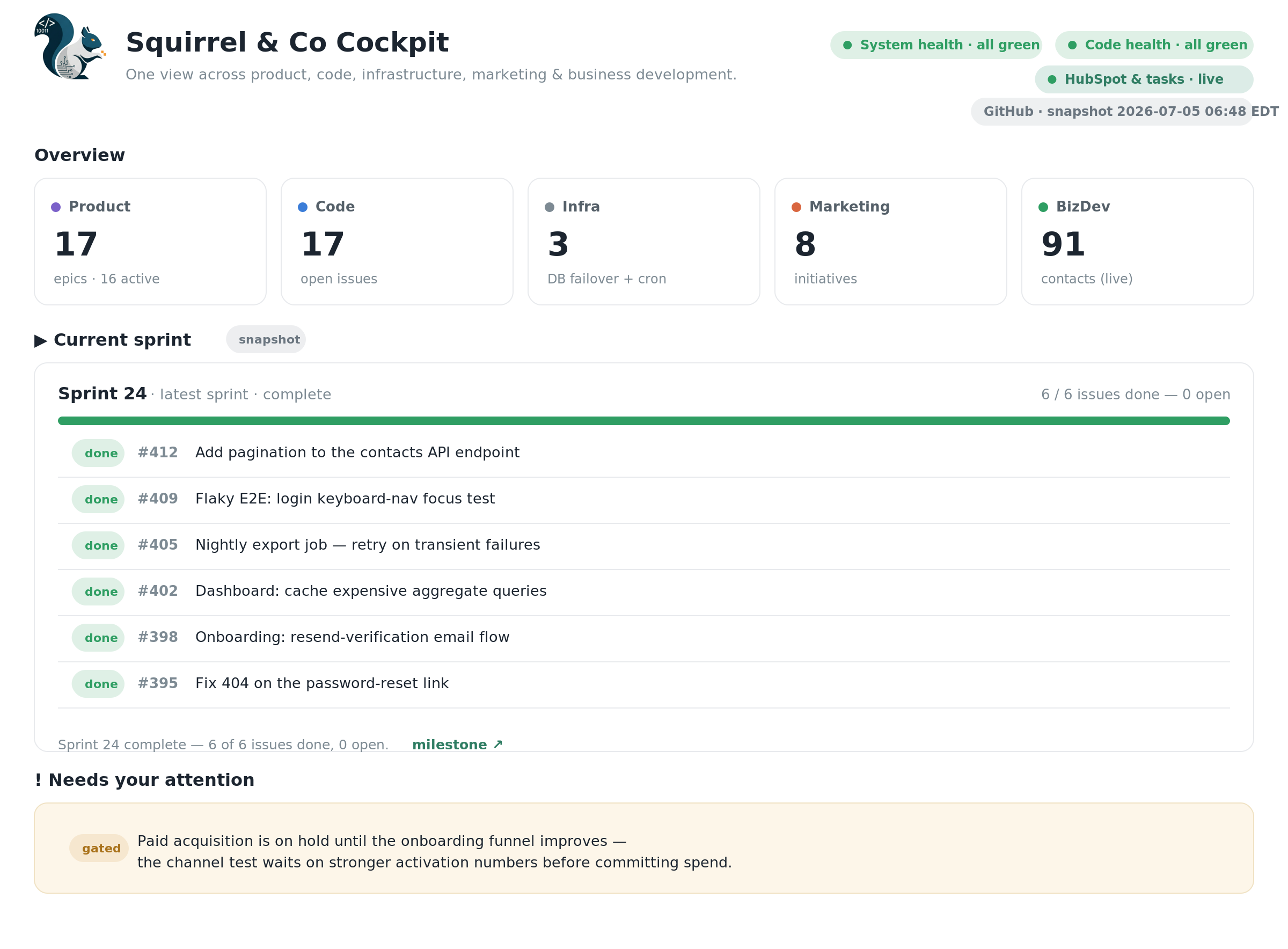
A dummied version of (part of) my actual cockpit — real layout, placeholder data.
Mine is a single cockpit across the whole business — product, code, infrastructure, marketing, and business development. Health at a glance, the current sprint, live CRM numbers, and whatever needs my attention, all on one page. Claude built it; it just keeps working. The shift is from asking to watching: instead of re-running "where do things stand?" every morning and stitching the answer together from five tools, I open one page and it's already current. And it's mine — not a dashboard product I bend to fit, but a view shaped around exactly the questions I ask, rebuilt in an afternoon whenever those questions change.
Most tasks don't need the top model — cheaper tools do the heavy lifting. Not every task needs the flagship model, and once that clicked, my setup got both cheaper and faster. Two moves did most of it. I send the cheap, high-volume work — summarizing, classifying, rough first drafts — to a smaller model running on my own machine. It costs nothing per call and keeps the expensive model free for the parts that actually need judgment. And I let small scripts handle the deterministic work: once the logic is written, a script with an API token just runs, and I'm not spending a fresh round of model tokens every time I need the same thing done. The idea underneath is simple — match each task to the cheapest tool that can actually do it, and save the premium model for judgment, architecture, and review.
My 15-year-old MBA notes became Claude's most valuable input. I'd kept the electronic version of my Kellogg course materials for more than fifteen years, dragging the folders from laptop to laptop, half-wondering why I bothered. Turns out this was why. I handed them to Claude and it built me a searchable knowledge base from scratch — technically a RAG, retrieval-augmented generation, which just means that before Claude answers, it searches my own library and pulls the relevant passages into its response instead of leaning on its training or a generic web search. I didn't write the retrieval code or wire up the storage; I described what I wanted, brought the material, and Claude did the engineering.
It's paid off most in marketing. When I'm working through positioning, segmentation, or pricing — the conceptual work — Claude grounded in those courses gives me sharper frameworks and more concrete guidance than a web search does. A web search hands me a blog-post summary of a concept; my courses give me the actual method, the way it was taught, nuance intact. The broader point is that Claude is far more useful when it's standing on material I trust. A web search is everyone's knowledge, averaged. A knowledge base built from my own material is specific, curated, and mine — and for the things I care about getting right, that difference shows. Notes I almost deleted a dozen times, plus an afternoon of Claude's engineering, are now one of the most valuable inputs I have.
None of this is about clever prompting. It's about treating Claude less like a magic box and more like a capable teammate you set up, direct, and check. Do that — give it your context and your tools, and hand it work instead of just talking to it — and the boring, valuable part of the job starts taking care of itself.
I run Squirrel & Co, an AI-powered company that uses AI to build products for human connection. This piece is what I've learned doing it.